Thursday, May 25, 2006

Computer Language Mailing Lists

I like learning new computer languages -- especially languages that do certain things better than the languages I already know. I think it's exciting to write real code in a language I've never used before because it's always a great learning experience.

By my experience, if you're venturing into unfamiliar territories, especially places where the cool stuff isn't mentioned in books because it's actually just been committed to CVS, your best resource for answers is often the developer mailing lists. On the mailing list, you can often get answers from real experts to almost any question you have. In many cases, a language's mailing list is almost an important a resource as the language's reference documentation. Yes, you can live without it, but you probably don't want to.

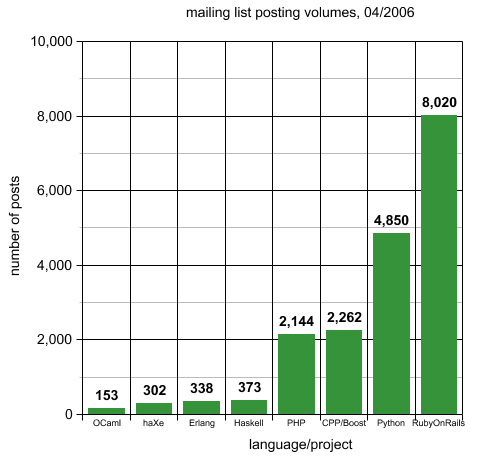
Generally, the more active a list is, the greater the chances are that somebody will give you useful advice when you run into trouble. Following this train of thought, I thought it would be interesting to measure the activity levels of mailing lists for different languages, so I looked the archives of several mailing lists and compiled the results into this lovely graph, which shows the number of postings on each mailing list for the month of April, 2006 (In a couple of cases -- C++/Boost and Ruby On Rails -- I just looked at libraries and/or frameworks that I believe are a central hub of activity for the language).


Despite Java's undeniable popularity, I didn't get any data on its mailing list activity because I just couldn't find "The" Java mailing list" after some searching on Google.

The Ruby On Rails has list nothing short of a phenomenal level of participation, which fuels the RoR's rapid development. PHP, Python, and C++/Boost have a very respectable level of community activity as well, reflecting their popularity among developers. OCaml and Haskell are great languages but judging by their mailing list activity, they haven't made it into the mainstream (yet?). haXe, despite its young age and small number of developers, has a relatively active community, which I attribute to its origins from the popular MTASC flash compiler its rapid improvement by its creator, Nicolas Cannasse. Erlang, which I think is underrated given its unparalleled concurrent and distributed programming capabilities, doesn't have a highly active mailing list in comparison to C++/Boost, Ruby, PHP and Python.

Hope you find this interesting. If you want to dispute my conclusions, go ahead and write a comment and I will make sure to promptly delete it.

Just kidding.

Here's where I got the data:

Ocaml
http://caml.inria.fr/pub/ml-archives/caml-list/index.en.html

haXe
http://lists.motion-twin.com/pipermail/haxe/2006-April/thread.html

Erlang
http://www.erlang.org/ml-archive/erlang-questions/200604/threads.html

Haskell
http://www.haskell.org/pipermail/haskell-cafe/2006-April/thread.html

PHP
http://marc.theaimsgroup.com/?l=php-general

Python
http://mail.python.org/pipermail/python-list/2006-April/thread.html

C++/Boost
http://lists.boost.org/boost-users/
http://lists.boost.org/Archives/boost/

RubyOnRails
http://wrath.rubyonrails.org/pipermail/rails/2006-April/thread.html

Got a MacBook!

I just got a shiny new MacBook at the Apple store in Soho... it is sweet! I knew I wanted to get one as soon as it came out. At first I had some reservations about the glossy screen, but when I looked at it side by side against the MacBook Pro's screen, I realized that the glossy screen actually looks much crisper and brighter and its reflectivity is not an issue unless there's a bright light source right behind you.

Before I got the MacBook, I made sure to order a bigger hard drive and 2 GB of RAM. I knew I would need the upgrades and unless you're rich or just a sucker you shouldn't buy it at the Apple store. I got the cheapest MacBook available for $1099 because I knew I would get the upgrades from NewEgg anyway, and I really don't care about 166 MHz difference or the black shell of the more expensive MacBooks.

Unfortunately, I haven't been able to install any of my upgrades yet because I don't have a tiny enough screwdriver to remove the metal piece covering the expansion slots in the back. So much for the promise of easy upgrades -- upgrading the Powerbook's RAM was much easier

The antenna is excellent. The MacBook picks up my wireless network from a much greater range.

I haven't run any serious performance tests yet but the MacBook definitely feels snappy, and that's without any upgrades.

Thursday, May 11, 2006

haXe: to Type or Not to Type?

haXe is a very cool language with a uniquely versatile type system. It's the only language I know that supports both static typing (explicit and inferred) and dynamic typing. For instance, in haXe, you can type


var str = "hello";

and the compiler will realize that 'str' refers to a String type. In fact, the above statement is equivalent to

var str:String = "hello";

This type inference mechanism is inspired by that of ML-derived languages (Haskell supports type inference as well). Although in most cases, you probably want to explicitly state the types of your variables for because type tags make the code more readable, I find it very convenient to rely on type inference in short code segments that use many temporary variables.

haXe is statically typed by default, so its compiler will complain if you try to do something silly such as


var str = "hello";
str.setColor("blue");


because the String class doesn't have the method setColor.

The fun thing about haXe is that it allows you to cheat. Using the 'untyped' keyword or by declaring an object as Dynamic, you can tell haXe to let you bend the rules and stop complaining. Take this example


var str:Dynamic = "hello";
str.setColor = function(color:String) {str.color = color;};
str.setColor("blue");
trace(str.color);


This is perfectly legal in haXe and it works as expected. Another way of doing the same thing is


var str = "hello";
untyped {
str.setColor = function(color:String) { str.color = color;};
str.setColor("blue");
trace(str.color);
}


Again, the haXe compiler accepts this code segment and moves along in its merry way. haXe's support for Dynamic typing is useful because it allows extend and manipulate objects in ways that don't really fit traditional OOP inheritence chains. For example, aspect-oriented design patterns can be implemented fairly easily in dynamic languages. In addition, the ability to temporarily sidestep its strict static typing typing allows haXe to play well with its dynamic predecessors -- Javascript and Actionscript.

I really like haXe's type system. It gives you all the flexibility of Ruby and Python without abandoning you at times when the compiler has enough knowledge about your code to be useful in finding errors. Dynamic languages fanatics would argue that static type checking provides only a marginal benefit because you have to test your code for correctness anyway, but I think they're underestimating static typing's advantages. By my experience, static typing speeds up development quite a lot -- especially during refactoring, when the compiler often points out where the refactored code has broken existing interactions. On the other hand, static typing zealots often dismiss the benefits of dynamic typing, which great frameworks such as Ruby on Rails show to allow the kind of "magic" that makes programming productive and fun. haXe gives you the best of both worlds. What more can you ask for?

More Worlds, of course!

Friday, May 05, 2006

Instance Variables: Top or Bottom?

A couple of weeks ago, a colleague and I had a discussion on the merits of different programming paradigms. The conversation, like many others, eventually wandered to the topic of the shortcomings of Java, an oppressive land where Everything Is An Object, Nouns are kings and Verbs are pawns, as Steve Yegge tells you in his blog. Java has it all wrong, once more we concluded; programming languages are truly expressive when their primary notions are expressed through functions (verbs), not objects (nouns).

But then my colleague said something that with which I didn't fully agree. He said that if you put a class's instance variables at the top of the file, before the method definitions, it shows bad style. After all, objects (nouns, data) are secondary to functions, and the most important parts of your code should appear at the top; therefore, your methods should appear above your instance variables.

At first I accepted this line of reasoning, but after thinking about it more I realized that I actually disagree. Don't get me wrong -- I'm not trying to make a statement here about the relative merits of different programming paradigms. I just think that since a class's methods refer to its instance variables but not vice versa, the instance variables should appear first. This way, when you're reading the code for the class's methods for the first time, the names of the instance variables are already familiar to you.

Well, that's how I feel about the subject :)

Wednesday, May 03, 2006

Gmail Works Over HTTPS!

Wow, the most shocking truth has been brought to my attention today: you can access Gmail over HTTPS! Just go to https://mail.google.com/ and let your email messages ride those SSL packets, entirely obfuscated to those evil Men In The Middle, to your heart's content. I had no idea... this is just great! I've always bemoaned the utter lack of privacy those free email services inflict on me, but now my life has changed... all due to a single 's'.

Friday, April 28, 2006

haXe + Xcode

Note: I added a haXe Xcode project template to the haxeXcode.zip pacakge (5/5/2006)

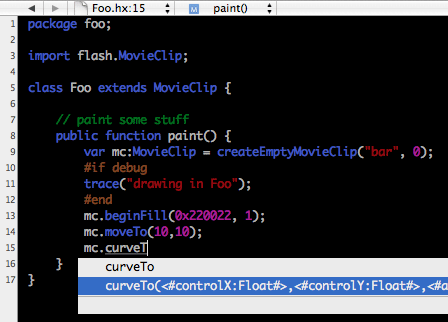
It turns out that, with a bit of effort, you can turn Xcode into a solid haXe IDE.

First, Xcode can provide excellent code highlighting and auto completion for haXe. To enable them, you have to install haXe language support files. You don't need to go through the trouble of creating such files yourself -- go ahead and download the ones I created: haxeXcode.zip.

To install haXe language support, unzip the package, put haxe.pbfilespec and haxe.pblangspec in /Library/Application Support/Apple/Developer Tools/Specifications/ and restart Xcode (note: haXe code highlighting is only enabled for files ending with .hx). If you only want the plugin to be installed for your user account, make the root path ~/Library.


(To create the language definition files, I modified the script for generating Actionscript language tokens I found on mabwebdesign.com to parse haXe source and output haXe language tokens. I then modified the Actionscript language definition files provided with the original script to support the haXe language. As you can see, most of the work has already been done for me :) )

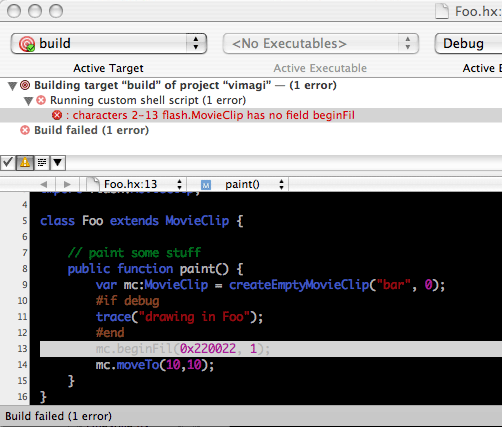
Second, the Xcode + MTASC trick I wrote about in a previous posting also works with haXe. You're probably too lazy to go back and read it, so I'll explain: if you call the haXe compiler from an Xcode shell script target, Xcode will correctly interpret haXe's error messages and point you at the problematic line in your code (tip: you can press Apple + '=' to jump to the error's location).


Here's the best way of setting up Xcode's build system for a haXe project:

- Create a new shell script target called 'build'.
- Edit the shell script to invoke the haXe compiler (example: "haxe compile.hxml").
- Create another shell script target called 'run'.
- Add the target 'build' to the new target's list of dependencies.
- Edit the 'run' script to open the generated swf (which you should embed in an html page) in Safari
(example: "open -a /Applications/Safari.app build/index.html")

When you set things up in this manner, if 'run' is your active target and haXe runs into a compilation error during 'build', Xcode will abort before reaching 'run' and Safari won't be opened, which would otherwise be a horribly annoying behavior. By my experience, this setup greatly speeds up development and testing.

Note: this is a new edit (5/5/2006). If you don't feel like going through all these steps yourself, you can install the haXe Xcode project template I created, which is included in haxeXcode.zip. Simply put the folder called "haXe Application" in /Library/Application Support/Apple/Developer Tools/Project Templates/Application and restart Xcode. Now, when you create a new project, you'll see "haXe Application" as an option under "Application." Just make sure to edit the "run" target's script to point at your location of the haXe executable. (The reason I chose to invoke Safari from a shell script is that the 'open' doesn't launch a new Safari process in case Safari is already running.)

Final tip: I set up CTRL-space as auto-complete key-combo. I use it all the time and it greatly speeds up coding.

Hope this helps! Let me know if you have any comments or suggestions.

Wednesday, April 26, 2006

haXe

The prevalent way to develop web apps these days is to use a server side language (PHP, Perl, Python, Java, Ruby, Erlang, C++, etc.) for backend logic, Javascript for browser (AJAX) logic and Flash/Actionscript to create swf's if you need vector graphics, animation and interactivity beyond that which AJAX can provide. This makes web development quite burdensome and complex. haXe was born out of a seemingly simple idea: it doesn't have to be this way!

If you were willing to put your aesthetic sensibilities aside, you could use Java to develop both both server side logic and client side applets. However, the JVM hasn't caught on as a platform for client-side development because the JVM isn't universally available (and it's a big download), and applets tend to be ugly and slow to start. (I'll reserve more articulate Java bashing for future posts :) ). Ruby on Rails has made progress in the one-language-for-all-needs direction with a cool new feature called RJS, which allows you to write Ruby code that Rails compiles into Javascript. However, there's no way to easily integrate SWF programming with ROR as far as I know. In addition, although I really like ROR, Ruby's speed is not exactly blazing and its lack of compile-time type checking has its disadvantages.

Enter haXe.

haXe is language with an open source compiler and a set of libraries that you can use to create all aspects of a web app: Javascript code, compiled SWFs and server side code. haXe has some great benefits: it lets you reuse code between all platforms; it eliminates the burden of shifting mental gears every time you work on a different aspect of your application; it makes it easy to write portable code that runs on all browsers and/or different Flash player versions; it has a very fast compiler; and, like most good things, it's open source.

haXe is also a very well designed language. Its syntax is similar to ActionScript 2.0's syntax, but haXe's type system -- a mix of static, dynamic and inferred typing (similar to that ML-derived languages) -- is far better than ActionScript's simple dynamic typing. From my experience using haXe, its type system is extremely helpful for catching errors early and developing maintainable code without sacrificing the flexibility of dynamic typing when you really need it. haXe's support for object oriented programming, closures, iterators, type parameters (similar to Java generics), enums (powerful variants types) and fully typed anonynous objects should convince you that haXe isn't a toy language by any means.

As you might have guessed, all is not perfect. haXe's server side features are not very mature -- but Nicolas Cannasse, haXe's creator, is developing them rapidly (and the Necko Virtual Machine, on which the server side code runs, looks pretty solid: Necko is supposedly 30x faster than PHP). The Flash 8 support is superb, but it's not clear when Nicolas will implement support for Flash 9. (Right now Flash 9 is in beta. I think Nicolas is planning to tackle Flash 9 support when Adobe makes the final releases.) In addition, the haXe community, although very enthusiastic, is much smaller than the various LAMP communities, so don't expect too many 3rd party libraries and tools (but you don't need such luxuries anyway: write your own!).

I've been mostly doing Flash development with haXe and I'm pretty impressed with its capabilities. I haven't used the Javascript compiler much, but it looks quite neat and I will probably use it more I have a greater need for AJAX. I also haven't touched server side features, which are the least developed aspect of haXe. I think that in a few months, when haXe is more mature, it will be an excellent language for all aspects of web application development.

Keep haXe on your radar. In the meantime, unless you're doing Flash development, go back to Ruby on Rails -- but don't forget that "haXe on Rails" ("haXOR," aptly suggested by a mailing list member) is around the corner.

Monday, April 24, 2006

Flash Programming

It's been a few years since I've done anything with Flash. I used to work a lot with Flash, and I like Flash, but I've been too busy doing C programming for my job to devote much time to Flash hacking. However, my interest in Flash has been recently rekindled by a cool project idea I had in which Flash would be a key component.

My interest in Flash is now almost gone.

Please don't get it wrong -- I don't have a pathetically short attention span. I'm still interested in the Flash player, which is a very powerful runtime for rich Web applications; it's the Flash IDE that I've abandoned almost entirely. Googling around, I have discovered an amazing wealth of open source tools for swf creation (osflash.org is a great starting point). The most impressive of these tools is MTASC, an open source Actionscript 2.0 compiler written in OCaml by Nicolas Cannasse. I have used MTASC to compile a very basic prototype for my application, and it works like a charm. The best feature of MTASC (beside the fact that it's open source) is its speed: MTASC leaves the Macromedia compiler in the dust, especially when you have to compile a non-trivial project.

MTASC also integrates really well with XCode, my IDE of choice. I discovered that when you call MTASC from a shell script target in XCode, XCode magically inteprets MTASC's error messages and points you at the problematic lines in the code. Combined with the Actionscript language definition files I found here, MTASC makes XCode an excellent Actionscript development tool. (I have tried using Eclipse + Ant but it was painfully slow -- at least on my G4 powerbook.) The only disadvantage is that XCode doesn't have a debugger, but it hasn't been a big issue for me so far.

MTASC has been fun for a while, but I already dumped it for a new tool. Not just a new compiler -- but a whole new language, haXe, created by none other than Nicolas Cannasse. I will write more about haXe soon.

Hello World

I decided to catch up with the times and start a blog about programming, technology, philosophical musings and basically anything that comes to mind. I have learned so much -- especially about programming -- from reading other people's blogs, so I wanted to give something back by sharing some of my knowledge with the rest of the world.
Plus, I've recently grown quite concerned with the shortage of time-wasting distractions made available to members of the modern workforce by the severely underutilized technology called the World Wide Web, so I decided I'll have to do my part to mitigate the situation by providing a worthwhile destination for my faithful readers as they stare at their browsers' hopelessly blank address bars contemplating whether Solitaire is about to make a comeback in their lives.

Enjoy.

This is me, at Fisherman's Wharf in San Francisco, with Alcatraz in the background:
At Fisherman's Wharf